I Packaged a Fingerprint Driver for Ubuntu, Then Deleted My Own Project
A lesson on trying out things I have absolutely no idea about
So I've been juggling a few projects lately, and somewhere along the way I kind of just switched to Linux full time instead of bouncing in and out of WSL. I had a separate gaming system, so I just made the switch permanent. Ubuntu was the obvious pick. The other candidate was Kali, and as much as I love it for pentesting, it is not what you want for ordinary day-to-day computing.
One thing that didn't survive the move was my fingerprint reader. This is the part where some people say "it's a small thing, just ignore it". Maybe I should have listened. But it bugged me that every single time I logged in I had to type in my password versus the previous move of just putting my finger on the reader. And so I decided to do the perfectly illogical thing a tech bro does:
Create my own fingerprint driver.
The Hail Mary
To be honest, I had never built anything like this before. But as my cousin likes to say, necessity is the mother of invention, and my slightly unhealthy need for that was necessity enough. I used Claude Code to research how fingerprint sensors work, why some operating systems ship drivers and others don't, and what it would take to write my own.
Before the story goes further, here is the distilled version of how a driver gets onto your computer, or doesn't. I learned this in under 72 hours, so feel free to let me know if I get anything wrong:
Hardware makers like Dell, HP and Lenovo write the drivers for their own kit and agree with OS vendors on how those drivers may be shipped. On Windows this is a smooth road, because Windows owns the overwhelming majority of the consumer market, so painless driver installation is a no-brainer for everyone involved.
On Linux it's a bit bumpier.
Some vendors help where they can. Others (NVIDIA, cough) can be a pain. Common parts like displays, keyboards and sound tend to work out fine because Linux drivers exist either way. The trouble starts with the specialised bits, like oddball function keys, custom hardware, or in my case a fingerprint reader.
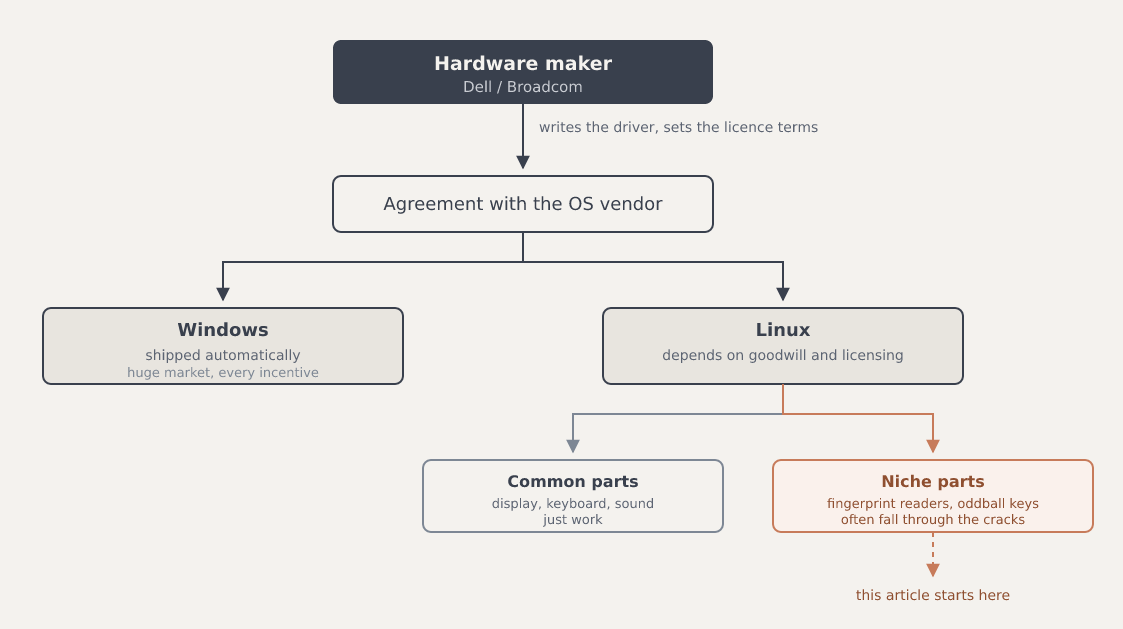
Linux distributions usually paper over this by having a team that prioritises what most people need, or by being open enough to let the community fill the gaps. For example, Fedora relies on Red Hat's kernel engineers, and Debian's volunteer Kernel Team maintains driver packages. Where manufacturers don't provide support, the wider Linux kernel community often develops and maintains drivers instead.
A fingerprint reader on a Dell Latitude hadn't made anyone's priority list, which is fair enough. When I opened the thread on Launchpad (Canonical's GitHub-like home for Ubuntu's code, bugs and package builds), I was only the third person to register the same complaint, on a discussion that had been opened the year before.
When I first asked Claude what it would take, the answer involved reverse-engineering parts of the hardware and a timeline measured in months. I was half asleep and wanted something sooner (and legal), so I asked it to dig into my specific situation instead. It came back with great news.
Dell's driver already existed, Canonical was already permitted to distribute it, and it was sitting in their archive. The catch was that it had only ever been wired up for Ubuntu 22.04, in a special OEM channel meant for that release. There was even someone on it: a Canonical engineer, Yao Wei, had been packaging the driver. The public bug thread had been quiet since March 2025, though his packaging work carried on in his own archive; it just hadn't reached Ubuntu's normal archive.
But it didn't cover the newest release, 26.04, which happens to be what I run. So I decided to take matters into my own hands. What could possibly go wrong?
Building it
It turned out to be surprisingly doable with agentic AI in the loop. My background in computer science and security had me thinking about the things that matter: the specification, a mental model of how it should all behave, how it copes when things go wrong, and testing. The actual coding was mostly Claude's.
What we built is a delivery mechanism. It didn't contain the driver, but fetched Broadcom's driver, checked it against a checksum recorded in the project so you could see it arrived intact, and installed it cleanly.
It came from Canonical's OEM archive (or from Broadcom's own download if Canonical's copy couldn't be reached). Either way, it travelled straight from them to you.
We both made mistakes. The first time the agent pushed to the repository, it included some internal working files and build artefacts that had no business being public. That one was on me too. I should have reviewed what was going out before it went out.
And while the very first install worked and my sensor sprang to life, I nearly didn't test hard enough to know whether it would hold up on other Latitudes running other versions of Ubuntu. I came close to shipping something that worked only on my desk. For that I used Docker to create throwaway containers for two Ubuntu versions, and exercised the packaging, the download, the checksum, the install and the removal.
Try it
If you came here to fix your own laptop, skip to the next section and install the maintained package instead. This is what I shipped at the time, and it is here because the rest of the story doesn't make sense without it.
If you have the same sensor (a Broadcom ControlVault 3, USB ID 0a5c:5843) on Ubuntu 24.04 or 26.04:
sudo add-apt-repository ppa:elementmerc/latitude-fingerprint
sudo apt update
sudo apt install libfprint-2-tod1-broadcom-installer
Then enrol a finger and test it:
fprintd-enroll "$USER"
fprintd-verify
The first install flashes the sensor's firmware, which makes it reset on the USB bus. If that first enrol says "No such device", reboot once and run it again. It won't re-flash, and enrolment then works normally.
One good thing that came of posting on the bug thread was that Yao Wei replied. He confirmed 5.15.285 was the newest build Broadcom had put out, explained he couldn't promise future ones for Ubuntu 26.04 and beyond, and pointed me at the packaging's debian/watch file. That pointer is why my installer learned about Broadcom's own download and started using it as a second source when Canonical's copy was unreachable. He also said he'd chase the uploaders about getting it into the archive properly, which is where it belongs.
And then the thing I built stopped being needed
Here is the part I did not expect to be writing.
On 7 July 2026, Yao published builds of a newer driver, 5.15.377, for 22.04, 24.04 and 26.04. The gap I'd built my installer to fill, no ControlVault 3 build for the newest LTS, was closed pretty quickly a few weeks after I turned up on the bug thread asking about it.
His package installed straight over my hand-laid copy of the older driver, took ownership of the same files without a conflict, updated the sensor's firmware in place, and my existing fingerprint still verified afterwards. No reboot, no re-enrol.
I hate to say it, but his was better than mine in every way that matters. A newer driver, by someone with access to the vendor, and packaged by someone who does this for a living.
So I've stopped. If you have this laptop and this problem, use his:
sudo add-apt-repository ppa:medicalwei/dell-cv3-cv3plus
sudo apt update
sudo apt install libfprint-2-tod1-broadcom
Mine is still on GitHub if you want to read it, and it will be archived shortly.
One piece is genuinely unfinished, and it's the packaging. At the time of writing, the driver still isn't in the Ubuntu archive itself, for any release. It lives in a PPA you have to know about, which means the people who need it are still the people who found a bug thread. That is the part worth someone's effort.
Lessons learned

I set out to fix my fingerprint reader and ended up deleting my own project, which is a stranger ending than I planned. But it wasn't for naught.
I learned how drivers reach systems. I learned that "nobody is working on this" usually means "you haven't found who is". And I learned that just showing up to try something new can go surprisingly far.
Catch you in the next one. Till then, cheers ✍️